Vega Constellation

Tonight was my first night out for a while, I think the weather has been pretty terrible lately, or when it has been a clear night I have been doing something else, like my photography evening class.

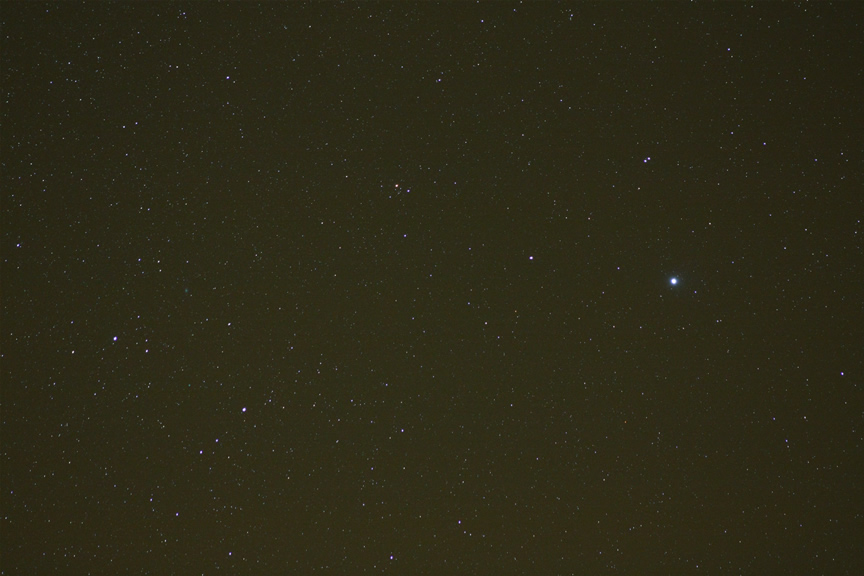
Anyway tonight I went out and decided to try out my homemade camera mount, which is on top of my guide scope.

I chose Vega for some reason, probably because I watched the film Contact the other night for the first time, and the signals from space came from Vega in the film.

I took a 30 second exposure on a 1600 ISO setting, using about 200mm lens, click on the image to enlarge it.

Constellation Vega

The Brightest Stars Book Review

The Brightest Stars Book The Brightest Stars book is all about twenty-one of the brightest stars visible from Earth. The Brightest Stars instructs you how to find the stars and the best way to see them.

Each section about each star contains information about the history of the star and legends that are connected with each star. There are also information on star distances, mass and composition. The book also includes star charts.

The Brightest Stars begins with a chapter on stars in the sky which asks the question How Bright is Bright? There is also information on the locations and yearly motions and names of the stars. The final part is about how to see stars better when looking at the skies, using your eyes and telescopes.

Chapter two is entitled Stars in the Universe which includes parts, structure, distances, and motions of stars in the universe, as well as the varieties of stars and the lives and death of stars.

The following stars are contained within the book; Sirius, Canopus, Alpha Centauri, Arcturus, Vega, Capella, Rigel, Procyon, Achernar, Betelgeuse, Beta Centauri, Alpha Crucis, Altair, Aldebaran, Spica, Antares, Pollux, Fomalhaut, Beta Crucis, Deneb and Regulus.

There are six appendices in total and a glossary in the book; with the appendices you get the positions of the stars via RA and Dec co-ordinates as well as magnitude measurements. You also get the masses of the stars and a list of the 200 brightest stars. There are also many other star information tables in the appendices.

The Brightest Stars is a great book if you want to learn a lot more about stars (obviously), the books images are in black and white though but it is nice that each star is given it’s own section which makes the book easier to read.

The Brightest Stars is available at Waterstones

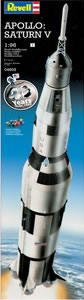
Apollo Saturn V Model

Saturn V Rocket ModelGet up to speed with the Apollo Saturn V, the American rocket that blasted the three lunar explorers to the Moon.

This stunning Revell 1:96 scale replica is a life-like model that includes launch platform and supports, plus four paints, double ended brush and precision applicator glue for detailed decoration.

What a great model for someone this Christmas. I know it would take me quite a while to complete this model, probably last all Christmas into the New Year.

Buy the Saturn V Model Rocket

If you are interested in this type of space model, then there are lots of others in the Revell model range including:

How To Make a Wooden Camera Mount

Since getting my guiding telescope on top of my Meade LX200, I have run out of space to put other items around the telescope.

When you first get an LX200 telescope, you think there are lots of screws to use to add extras, but they soon get all used.

I currently have the Meade finder on the left hand side of the scope, the guiding scope in the middle on a rail and rings, on the right I have my Telrad.

The Telrad was originally stuck to the tube with some sticky padding although I wish I had never done this, so instead I drilled some holes into the Telrad base and screwed this into the tube. Because of all these items on the top of the scope, I then required weights on the underneath of the scope.

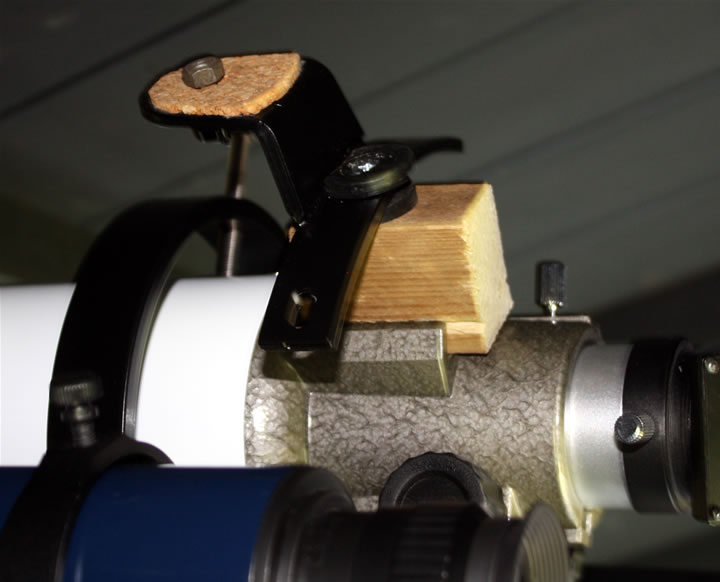
So, this means there is no space left for my DSLR camera, a bit of a pain if I want to do some normal widefield photography using my camera lenses. To get around this I decided to build a camera mount that would slot into the finder slot on the guiding telescope, which I was not using.

To do this I got myself a small piece of (1.5″ x 2″) wood which was about 2.5″ long.

I began by using a chisel to take out a line of wood where the finder mount would slide on, you could also do this with a screwdriver. The wood block will stay in place by using the screw on the finder mount on the telescope.

I then used the current metal camera mount I had and screwed this to the block of wood, between the metal camera mount and the piece of wood I did also add two rubber washers.

And that’s it, a simple way to add your camera onto your guiding scope.

Wooden Camera Mount in Finder Slot

How To Make a Diffraction Spike Mask

I have seen these pleasing images where the stars have spikes coming out of them, most notably on the pleiades (seven sisters) images.

I want to be able to get these in my images as well, and now I have found out how to get them by using a diffraction mask on my LX200.

Today I decided to make some by using some plywood left over from my observatory build.

Here is a list of the raw materials I used:

  1. Plywood
  2. 8x Screws
  3. Spare length of wood (24″)
  4. 2ft Washing Line
  5. Black Wood Paint (optional)

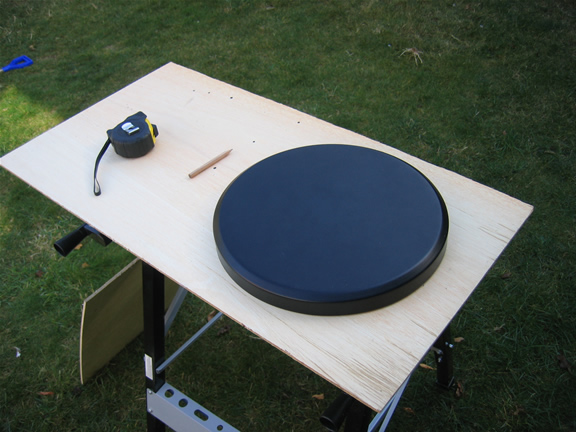
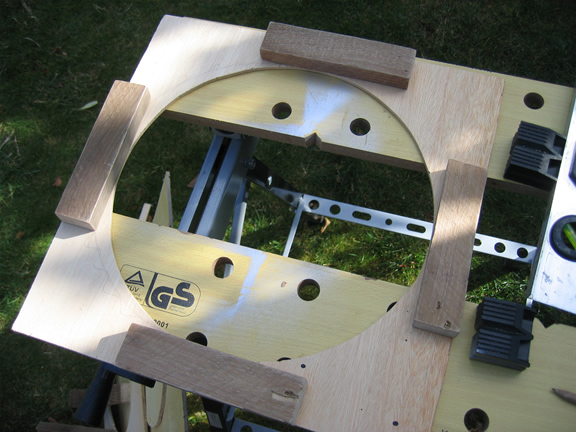
Cutting out the wrong size maskCutting the right size maskI began by taking the LX200 telescope metal cover and drawing a circle around that thinking that would be just right, although after then cutting it out with a jigsaw I found out that it was far too big.

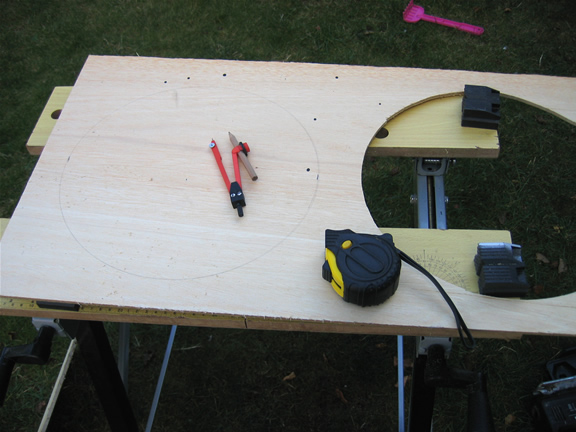
So I went back and just measured the diameter of the telescope and then found an old style school compass to draw the circle on the wood.

I then cut out the circle using my electric jigsaw.

I then cut down the piece of plywood into one manageable piece, with about 1.5 inches to spare around the sides of the hole.

Adding all side woodNext I cut four lengths of some rough timber I had spare which was used on a previous gardening job. You don’t have to add this part, but I did because I wanted the mask to sit back from the front of the telescope, plus these pieces of wood at every side allowed me to make the mask fit snugly around the scope.

I then screwed the pieces of wood with 2 screws on each of the 4 pieces of wood, although I only used 1 screw on 2 pieces of wood so that I could still move the pieces of wood once the mask was on the telescope to fit them even more snugly against the scope.

Now go back to the telescope and place the mask on the front and mark on the blocks of wood you have just attached to the mask where the screws are on the LX200. You should have a screw in each of the four corners of the cover that holds the main front glass in place on the front of the telescope.

Doing this will mean that your washing line crosshairs will be exactly in the centre on the mask.

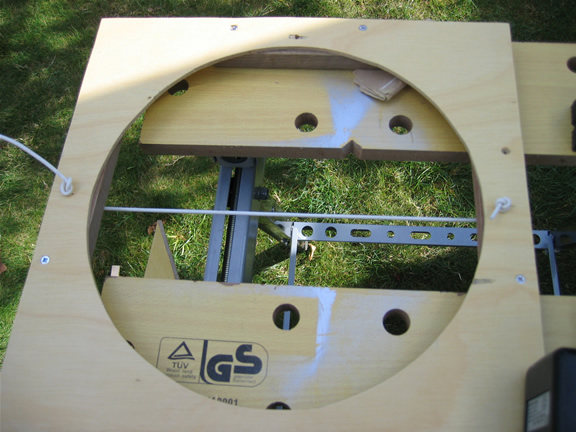
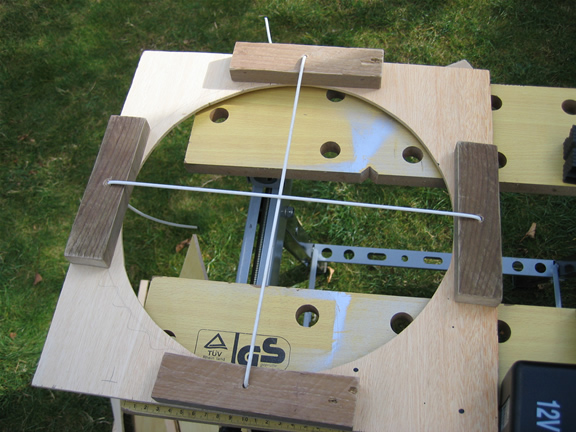
Adding washing line crosshairsI then cut 2 feet of washing line from our main home washing line, although you could go out and buy this. I then cut the 2 foot piece into 2 x 1ft pieces.  I tied a knot at one end of each pieces of the washing line.

Now drill holes with an electric drill all the way through the blocks of woods at the location you previously placed your telescope screw marks.

Thread the washing line through one of the holes. To hold the other end of the washing line in place I could have used wing nuts or bolts, but I did not have any, so I used a piece of dowelling, and hammered this into the holes to hold the washing line in place.

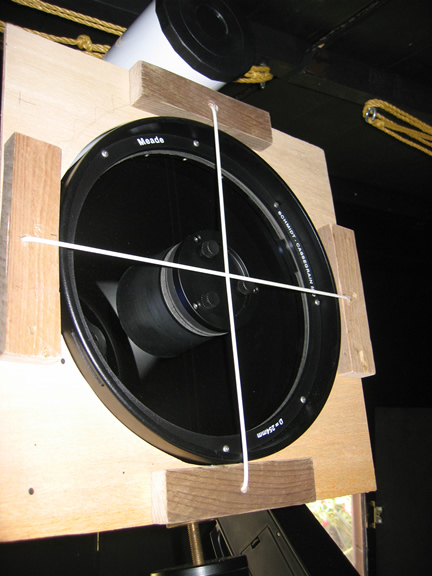
Diffraction spike mask completed unpaintedDiffraction spike mask on lx200I then tried the mask on the LX200 to make sure the washing line crosshairs were exactly centered.

On my first attempt they were not so I had to re-drill some more holes and re-thread the washing line, then they were perfect.

Here is the unpainted mask on my 10″ LX200 telescope.

I then painted the mask by using some black wood paint from Wilkinsons.

Hopefully I will now get the chance to try the diffraction spike mask out and see what images I get.

Damian Peach No Show at FAS 2009

Hi, Just returned from a day at the Cambridge Federation of Astronomical Societies Annual Convention. It was quite a nice and quiet day at the Cambridge campus.  I arrived just after the Dr Hayley Gomez talk, to be told on the door that Damian Peach was ill and would not be presenting.

It was really strange, as I was thinking what would I do if he did not show up, on my way to Cambridge in the car. Would I just ask for my £8 back and go home and do something else? Because I had only turned out to see Damian, but I stayed anyway and had a quick look around the stalls and luckily Jerry from Loughton AS stood in and gave a good old fashioned slide presentation instead.

After lunch, Chris Lintott spoke on Galaxy Zoo, the same talk he gave at Herstmonceux, but luckily I did not attend that talk. After that I then came home without waiting for Martin Ree’s talk.

I hope that the FAS still publish Damian Peach’s talk on the web as I would still like to read it, but I was gutted he did not show up along with several other people.

Bolting Down The Astronomy Pier

As you probably know I purchased an Astro Engineering Pro Pier and drilled the holes for the pier bolts at the time I laid the slabs for the base of the shed.

I had thought I was going to secure the bolts at the same time of laying the slabs, but I must admit got a bit scarred about doing it, and then kept putting it off. I then thought about doing it before the shed was erected, but then ended up doing it once the shed was completed inside and out, so in fact I made this the last of my jobs.

I used a bolt kit from Pulsar Optical which was around £35, it includes the four pier bolts, with washers, nuts and dome nuts. It also comes with a tube of gunk which has to be used with a mastik type gun.

I had previously hired an STS drill to drill out the holes, so I began by cleaning out the holes. To do this I attached a small tube to the end of an old vacuum cleaner to get to the bottom of the holes I had drilled.

Next I unscrewed the end of the gunk and found a metal clip around the inner plastic sleeve. I cut this metal clip off and then re-attached the nozzle and place the tube into the dispensing gun.

Now for me, on the first attempt the gunk did not set at all. I was deemed to have been very unlucky as inside the tube there are two colours which must mix together before they are squirted into the pier bolt holes.

For me, this not happen on my first attempt, it looked like one of the chemicals was restricted from leaving the tube. So I thought everything was ok ,so left it overnight and came back in the next day at lunchtime to find the bolts had not set in the groud at all. So off I went back to Pulsar Optical who were straight onto the phone to the manufacturers of the gunk and the MD of the company even phoned them back. The company offered to send a new tube of gunk and some metal cleaning brushes so that I could get the unset gunk out of the pier bolt holes. James at Pulsar Optical also provided me with another set of clean bolts, which was really good of them.

The next day I went back to pick up the cleaning brushes and the new tube of gunk. That evening at about 7.30pm I began again. Once I had cleaned out the holes I cut the metal end of the gunk off and put it in the gun holder. I then made sure this time that I could see the two chemicals mix inside the nozzle. Now it did take at least two full trigger squeezes in order to get a good mix of the chemicals.

I squirted the gunk into the holes one at a time, starting with the nozzle at the base of the holes and filled them to about 50% full. I then took my electric screwdriver and added an attachment so that I could screw the bolts into the gunk in the holes which is now very dense. This allows the gunk to get into the grooves of the bolts.

I repeated this for each of the four bolts in turn. You will find that a lot of gunk will spill over the holes, you just need to have a rag ready to clean this up.

I then lifted the pier over the bolts to make sure the bolts were in the right location. I then left the bolts overnight, and in the morning returned to find the bolts were completely rock solid in the ground.

I then cleaned the bolts up as some had some glue around them which would stop the nuts from been tightened. I just took a stanley knife and chipped away at the glue to clean them. I also removed the pier again, so that I could make sure I cleaned the bolts all the way to the floor as I did not want the glue on the bolts to stop the nuts being tightened as much as possible.

I then placed the pier back on the bolts and tightened them up. Job Done!

There are many different ways of completing this job, as I was advised not to lift the pier on and off the bolts, as the weight of the pier could dent the grooves on the bolts and render them useless, but for me this was not a problem. You could always make a wooden template and use that as a guide. I was worried that the bolts would not set in the correct position, as there is really no room for error, so placing the pier on top of the bolts seemed the most reliable method to me.

Jessops Camera Voucher Codes

I don’t usually publicise this sort of thing, but I have found some discount voucher codes for Jessops cameras online:

Use code CAMERAS8 – 8% off all compact digital cameras – Ends midnight 9th Oct

Use code NIKD300 – £30 off the Nikon D300 body – Ends midnight 2nd Oct

Use code NIKD300S – £50 off the Nikon D300S body – Ends midnight 2nd Oct

You can use these discount codes at Jessops now!

Herstmonceux Astronomy Festival 2009

This was my first visit to Herstmonceux on the south coast near Hastings. I had heard so much about it and remember seeing the adverts for it last year, but I was still unsure if I wanted to drive for two and a half hours to get to the site, but I’m glad I made the visit.

After coming off of the M25 you are then driving a long a lot of tree covered single carriageway roads which have a lot of twists and turns, but once I had arrived I made out the numerous observatory domes immediately with the campsite right in front of the science centre.

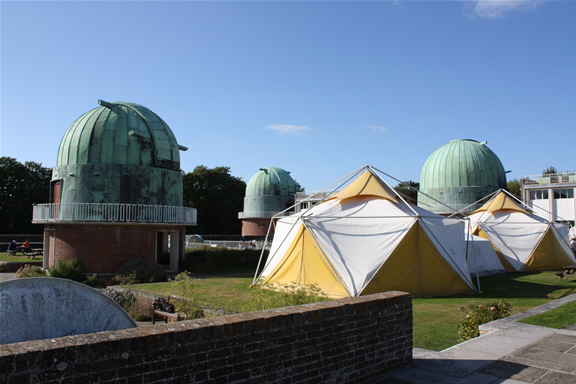
Herstmonceux Domes and Tradestands

Luckily the weather was quite good, a little windy, but the telescopes on the Pulsar Optical tradestand did give visitors a view of the sun and the daytime moon.

The astronomy festival includes several tradestands from Ian King Imaging, Pulsar Optical, Telescope House and BBC Sky at Night Magazine as well as others. In a separate large tent was a collection of local astronomy societies as well as the SPA, which this year I actually joined for £12 for an annual membership which gets you a quarterly magazine, periodic newsletters and 5% discounts from astronomy retailers. They also provided me with a copy of the latest magazine, a pen and a red light pen once I joined.

The Herstmonceux site has 6 observatory domes, all were being used for various purposes during the day. One of the domes was being used for a very interesting exhibition of the history of the site underneath one of the telescopes. Another dome was the location for the talks during the day, again sitting underneath one of the telescopes. A third was open to viewing, the others were closed on the Saturday but open at other times during the weekend.

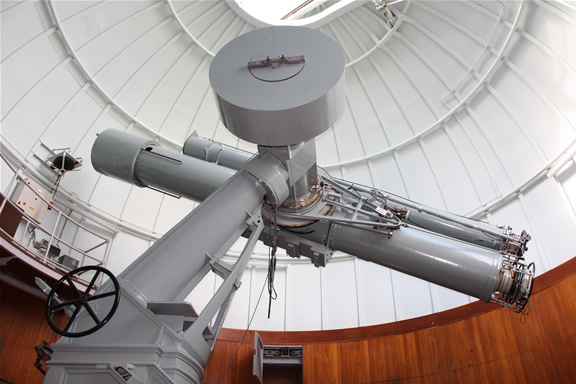
Herstmonceux Refractor Telescope in Dome E

Other amenities at the site included a beer tent, with a very nice Harvey’s bitter. There was also a canteen and lots of activities around the science centre. Herstmonceux does seem a perfect place for a school trip with a shop at the entrance and lots of science related activities in the centre.

I arrived at about the time Chris Lintott was speaking on Galaxy Zoo, but I did buy 3 lecture tickets for the afternoon, priced at £2 each. All three talks were very good, including:

  • Stuart Clark – “What’s Wrong with the Sun”
  • Ian Ridpath – “Exploring the Moon”
  • Nik Szymanek – “Imaging the Deep Sky”

One thing I must say though, is Nik please amend your talk, as I have now seen that same talk three times! Twice in Cambridge I think, and I did see your talk at the Bedford Astroblast, but at that you did do a slightly different talk.

I know it is difficult to gauge your audience at these events, but I would personally appreciate a slightly more technical talk on how to take the images like yours, instead of just going through the images you have taken and your Tenerife trips.

At the end of the day there was a raffle prize draw and then extra activities during the evening session, but I instead decided to leave at about 6.30pm,  but before I left I decided to walk down to the castle in order to get a few pictures of the very impressive castle and moat.

View all the photographs from Herstmonceux

Observatory Finishing Touches

Once the roof had been put on and the opening doors re-attached, the work on the observatory was far from over.

To begin with, the next day rain was forecast, and that was the first test of the roof. I sat in the shed whilst the rain lashed down on the roof, and after a while I found I had four leaks.

The leaks came from where we had screwed in the hinges but then moved them, so the next day I was on the roof filling the holes with mastic.

I also found that I needed a lot more felt pins on the roof so hammered a load more in.

I also went to Wilkinsons and purchased a few more ironmonger bits, including some black cast handles which I have attached to the outside of the roof. I also purchased some cheap rope from the pound shop to allow me to open and close the roof.

I ended up buying some screw-in loops to tie the rope to on the inside and then push open the roof from the inside whilst keeping hold of the rope to lower the roof down onto the roof wooden stoppers which I also added to ensure the roof came down horizontally.

I then added the same rope on the outside of the roof and tide it to the black handles on the top of roof, then to close the roof, I go outside with a small lightweight aluminium ladder and push the roof closed, whilst holding onto the rope and lowering the roof back down.

I used cabin hooks and black tower bolts in order to keep the roof down. The cabin hooks attach the roof to the shed, whilst the tower bolts bolt the two roof pieces together.

I also purchased some cheap black carpet from Carpetright and put that down on top of some newspaper. I kept the carpet down by using a standard office staple gun and stapling it into the wood.

I purchased a cheap computer desk from Argos, and added a Belkin UPS so to keep everything on for a while in case the power goes off.

I have also added some shelves, very useful for keeping things neat and tidy, and I managed to purchase a wood drill bit the same size of a 1.25″ eyepiece and drill 6 holes in the shelf in order to hold my eyepieces.

I also purchased some cheap 3m USB 2.0 extension cables from eBay so that I could run these cables under the carpet from the PC to the telescope. This means that I have usb sockets ready to use around the wedge, useful for setting up webcams, DSLR and CCD imagers, plus they were only about £1.60 each.