
Archive for : February, 2011

Hidden Treasures Book Review

Hidden Treasures BookHidden Treasures is a big, heavy, nearly 600 page book which includes an original selection of 109 deep-sky objects. None of the objects are included in either the Messier or Caldwell catalogues. Together with this all the objects are supposed to be visible with a 4” telescope under dark skies.

The Hidden Treasures book is one of three books by Cambridge University Press in the Deep-Sky companion’s series. The others are called The Messier Objects and The Caldwell Objects. With the Hidden Treasure book being so good it seems definitely worth buying the other books as well.

Each of the 109 hidden deep-sky treasures is clearly labelled, with some good introductory text, photographs of the object, sky maps and sometimes drawings.

There are several appendices at the back of the book, the first one is about Caroline Herschel and it takes you through some of her astronomical findings. The other appendices provide you with basic data in a table form of the 109 objects, there are also 25 additional hidden treasures to keep you going once you get through the whole book.

It’s really worth taking your time going through each deep-sky object in this book and discovering some new sites to behold when you are out on an observing session. Overall this is a great book, as I love it when objects are clearly labelled and you can jump around the book easily. It’s also nice to just have a few pages per object and so you don’t get bogged down in lots of details. I look forward to reviewing the other books in the series.
Hidden Treasures is available at Waterstones

Observatory Power Supply from Rapid

Whenever you buy a dew heater system you need something to power it, for some reason I went for a Battery Powerpack from Maplin, which is very good and has an invertor on it, compressor, 2 12v cigar sockets and a USB charger socket, battery clamps, a worklight etc etc.

But I hate having to remember to charge it every time the day before I want to observe. So to get around this I purchased a 12v 4.8w Solar Panel from Maplin to keep the battery topped up. This is a good idea, but the window in my observatory does not get much light and there is not much sun around in the winter.

So I decided to instead purchase a desktop power supply for the observatory, why I never bought one in the first place – god only knows! As I have power sockets in the observatory. It was probably because everyone seemed to have a Powertank so I thought I’d better get one as well.

After scanning the web and the astronomy retailer sites, I wanted an observatory power supply which did not have a fan in it (I like silence when observing), one that had enough amps to power my equipment and one that did not cost too much to have it posted to me, as these things are heavy.

Rapid Power Supply

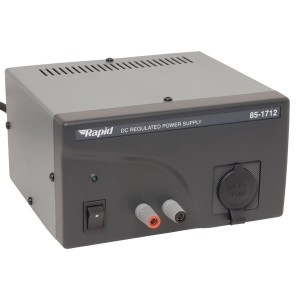
In the end I purchased the Rapid 4A 13.8V Fixed output DC regulated power supply. It was only £43.20 inc VAT with Free Delivery.

I ordered it at lunchtime direct from Rapid and it came via UKMail the next day, looking at it, it seems very well made and robust and does the job nicely.

The new version is the 85-1714 Rapid PSU

I can thoroughly recommend it as a silent observatory power supply for your telescope, dew heaters, CCD cameras etc.

Rapid 13.8v 4-6amp Observatory Power Supply Features:

  • Fixed 13.8V DC output
  • Screw connectors and 12V cigarette lighter accessory socket
  • High stability
  • Low ripple and noise
  • Compact size
  • Overload and short circuit protection
  • Galvanised steel case
  • Polycarbonate front panel
  • Cooled by natural convection
  • Control Your Observatory PC Remotely

    Since the weather has been very cold lately I thought about putting in a warm type of partition in the observatory to keep me warm whilst imaging, but I knew there was a way to remotely control your PC, as a lot of people do it, now I know how and it did not cost me a penny.

    There are services on the web who will charge you a fee so you can access your PC from anywhere – such as GoToMyPC etc. But there are other ways as well.

    The first thing I looked at was using the program “LogMeIn Free” which is a free program you install on both machines, there is also the free VNC servers, such as TightVNC or UltraVNC.

    But I found that Microsoft Windows has ‘Remote Desktop Connection’ and it’s really easy to set up.

    The only downside is that ‘Remote Desktop Connection’ on the host computer (the one you are trying to connect to) must be a XP Professional, Vista Business, Vista Ultimate, Windows 7 Professional or Windows 7 Ultimate edition.

    You can use any Windows version on the client machine (the remote one that you are using). I even connect to my observatory PC via my Samsung Netbook which runs Windows 7 Starter edition!

    If you have the correct version of Windows on both the remote PC and the local control PC or laptop. All you need to do is (this is what I did on XP Pro):

    1. Create a user account on the remote PC and give it a password
    2. On the remote PC right click on My Computer on the desktop and go to ‘Properties’ and then choose the ‘Remote’ tab. Then make sure the ‘Allow users to remotely connect to this PC’ is checked.
    3. Now go to your other PC and go to ‘Programs -> Accessories -> Remote Desktop Connection’, now enter your IP address in the computer field and enter the username you set up on your remote PC.
    4. If you now click ‘Connect’ and everything is setup properly the remote PC desktop will appear on your screen.

    I know there is nothing like being next to the telescope to sort things out, but in the future if it’s doing a long imaging run, I may leave the observatory and just check up on the imaging run via my laptop in the more comfortable and warmer house.