Observatory Build Continues

Things are still pressing ahead around normal paid work and looking after my son. But today I had the shed delivered and the slabs, sand and cement from Buildbase. Whilst unloading the van I remembered just how heavy the 600mm concrete slabs really are and how they will break my back when I come to lay them out. I usually use the smaller 450mm which are a lot easier to handle, but their size this time just did not fit the plan.

I ordered the shed untreated, so visited Wilkinsons to buy some stain the other day, I nearly purchased the Cuprinol brand, but at £15 for 5litres, I went for the Wilkinsons own brand which looked just as good for £6.99 for 5litres. In the end it’s probably the same stuff and probably made by cuprinol for Wilkinsons anyway.

I painted a few sides of the shed tonight before it got too dark to see, but I think I will need a couple more 5litre tins of “English Oak” before I am finished, especially if I am staining inside and out and giving the bottom of the floor several coats.

I think next time I will get the shed supplier to treat the shed for me before delivery, saving me a bit of time, as they charge 10% of the cost of the shed to treat the shed, which would have been around £35-£45, a little more costly than doing it yourself, but probably worth it.

Observatory Build – Filling The Hole

Today the hole was filled by an AnyMix concrete mixer. I spent a while looking into how to fill the hole, whether to manually mix the concrete myself and hire an electric cement mixer and order in the cement and bags of ballast.

But after using some online concrete calculators I discovered I actually needed 2x 1ton bags of sand and possibly something like 13 bags of cement. This price came to about £160 with the hire of the cement mixer, I thought it would originally cost me about £70 to do it myself, but a 1 cubic metre needs more aggregate than I thought.

The 1 ton bags of sand were not too bad price wise, as BuildBase sold them for about £45 each. Anyway I then decided to call around concrete companies and get some prices.

At the time I did not really know what mix type I wanted, as it all seems a bit confusing to me. James at ScopesNSkies recommended a 3 to 1 mix, so (1 cement, 1 gravel, 2 sand).  I was told by some companies that this may be too rich, as adding too much cement would mean the block would crack.

So in the end I got prices for a C35 mix type, although Hanson advised a fibre mix with hair in it.

Hanson quoted about £250, Cemex quoted £206, Tarmac would not deliver to my area, and finally AnyMix originally quoted £167, but after phoning back and saying I was originally quoted £150, they agreed on this price.

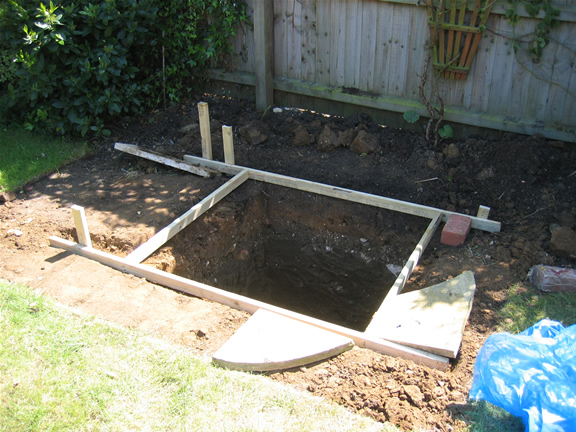
Hole with Wood FrameThat was great as this price, was less than what it would cost for me to do the mixing myself, so the delivery was booked just 24hrs before, for a 3.30pm delivery.

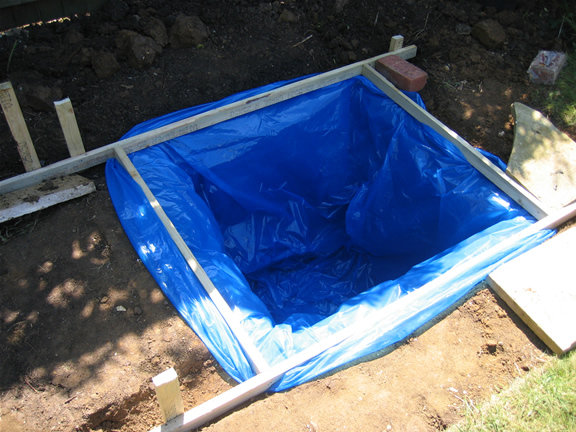
My father and I began by building a wooden frame so aid with levelling the concrete. I bought the 2×3.6m 1″x2″ wood from Travis Perkins for about £6.50. We then also used some blue plastic liner to contain the moisture of the concrete. We actually used 2, one inside the other.

Hole with Plastic LinerThe delivery was a bit late and arrived at about 4pm, but the driver was very accommodating and friendly, and we used 2 wheelbarrows to offload the concrete.

Even though the hole was nearly exactly a 1 metre cubic hole and I ordered 1 cubic metre, we still had about 5 wheelbarrow loads left over in the concrete lorry. Luckily the driver decided to get rid of it for us, although with hindsight we could have used it for the footings to go under the slabs. But we had not thought of this and had not pre-dug the space.

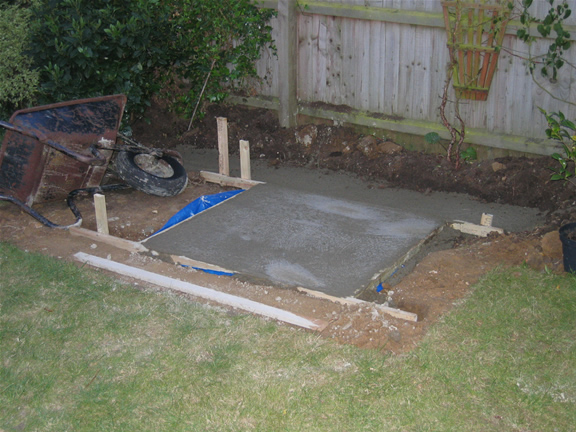
Hole Filled with ConcreteNext time, if there is a next time of doing this, then I will pre-dig the footings to be ready for any over supply of concrete.

The concrete went in well, and it was a bit of hard work barrowing the concrete. My Dad levelled off the concrete with a large length of wood and now it’s drying off. Apparently it will take about 1 week to fully set.

Found a Hedgehog in my Hole!

The observatory pier base hole has been empty for a couple of weeks now, waiting for me to get my concrete order set up.

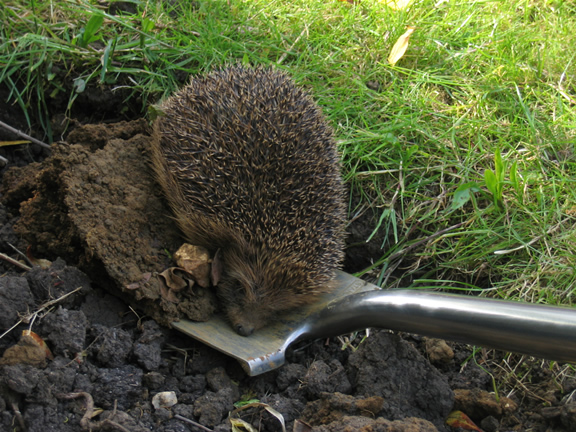
Hedgehog on my spadeWell today I popped out to Travis Perkins for some wood for my concrete frame, and when I came back I found a hedgehog asleep in the 1 metre deep hole. Poor thing must have fell 1 metre, one evening and then settled in, although it does appear that it did try and do some digging whilst occupying the hole. I think it may have been in the hole a maximum of two days.

Anyway, I got it out by using my spade and lifting it out and taking some soil with it, as to not disturb the hedgehog.

Here is an image of the hedgehog still alseep after being set free.

I left him snoozing on the spade, but after returning an hour later he was gone.

Observatory Build – Digging The Hole

This is day three and day four of the observatory build. My goal this weekend was to dig the cubic metre hole for the mount base. I had a 2 yard skip delivered on Friday which cost £60. I also borrowed my dad’s wheelbarrow to complete the task.

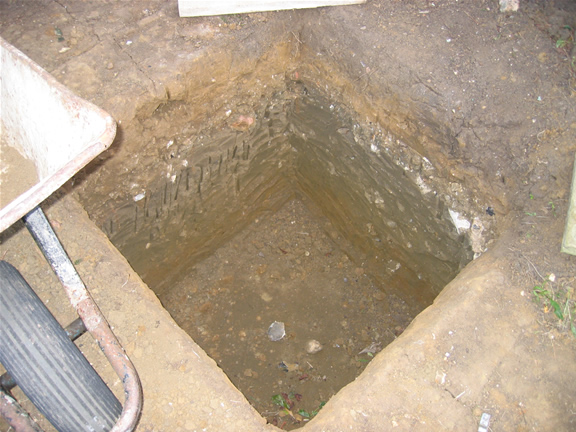
Observatory Mount/Pier Hole Now DugI started at about 9am on Saturday morning, and the first couple of spade lengths went really easily, but then I hit the builders rubble level, and this point nothing was going through, not the spade nor the fork. At this point I was ready to give up and visit the tool hire shop for a pneumatic hammer or drill or something! But after a bit of perseverance and actually inserting the fork and then doing a circular motion I actually made it through the rubble and stone level.

This gave me renewed motivation, and luckily by 12noon I had to stop in order to go out to a BBQ. At this point I had dug to a level of about 30cm, so only about 70cm to go!

Sunday I carried on and started at about 10am and dug for most of the day, with a 2 hour lunch break. I ended up putting the parasol and base above me to keep me out of the direct sunlight which help enormously.

I did find the digging now reasonably straightforward, as I went from brown clay onto grey clay which was a bit smelly. Throughout the digging I was also joined by a friendly blackbird looking for food, as well as a bee who enjoyed visiting the new small holes made in the sides of the hole.

The Bottom of the 1 Metre HoleSo at about 5pm the hole was complete, but only after shaving a few centimeters of the sides, as my digging was not completely straight. The sides don’t measures exactly 1m, at some points it is 95cm wide, but I hope this won’t matter too much.

Next I am going to have to fill my hole with concrete.

Observatory Build – Day 1 and 2

This was the first couple of days I actually got started in preparing the observatory base. I have spent a few days browsing websites, talking to astronomy retailers and other observatory owners on the web.

I also drew up a loose plan of the observatory and what number of slabs and aggregates I required. I drew up an image in Fireworks (the Macromedia photo/paint program) which allowed me to draw lines, boxes and circles and move them all around to see what fitted.

Day One

I began my first day by moving the current shrubs in the border out of the way and re-planting them somewhere else, this basically took me the whole of day one.

Once the area was now clear, I then marked and measured out the area of the location of the shed.

Day Two

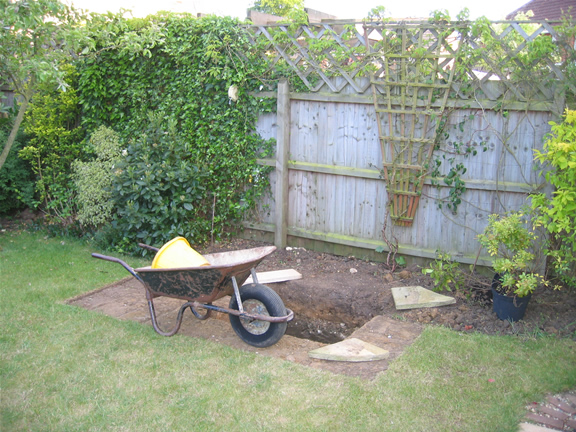
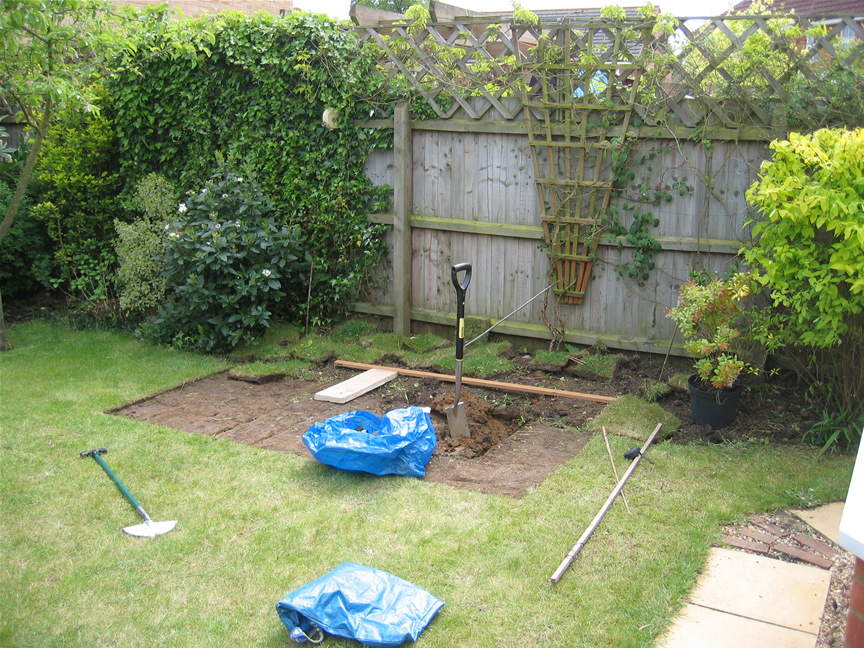
Observatory Base, Grass Removed and Ready for Pier Base to be dug.Today I took up the turf that was in the way and also measured out the central hole, where to concrete base for the pier is going to be. I have been advised by James at ScopesNSkies to dig a cubic metre for the base, so 1m wide, 1m long and 1m deep.

This is a fairly big hole, so I am considering getting a small 2 yard skip to take the soil. Instead of mixing the concrete by hand, or with a mixer, I am also going to enquire about the cost of getting the concrete delivered, then just using wheelbarrows to take the concrete to the back of the house. I have read that 1 cubic metre is about 20 barrow loads.

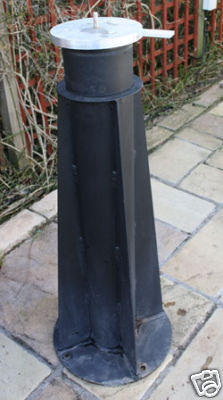
Bought AE Pro Pier

Last week I bidded on an Astro Engineering Pro Pier on eBay, luckily at the last minute I won the auction. I do find that these kinds of pier don’t appear that regularly on the 2nd hand market, as most people are using them, so I’m glad I got it.

The only problem was that the pier was 200 miles away in Chester. So on Sunday I made the journey over to Chester in 3hrs, really easy when you have a Sat Nav!

AE Pro PierGosh those piers are heavy, it took two of us to put it on the backseat of the car and my wife had to help me get it out of the car when I got back.

There was a slight bit of rust on the bottom, so I am considering getting some smooth Hammerite and painting it.

I also purchased a 2nd hand Meade Ultra Wedge a while ago so now I have the set up. The next thing is to look for a shed and start that observatory project, as I’m fed up with the weight of the LX200 10″ and the time it takes me to set up.

So I shall be posting regularly and keeping you up to date on my observatory project.

Microsoft World Wide Telescope Talk

Last night I attended a talk at the Institute of Astronomy by a Microsoft employee named Jonathan Fay about the World Wide Telescope program.

It was great talk, and good to see a live demo on a piece of software from Microsoft which is free to download and use on Mac/PC and soon Linux or you can use the web client version.

The World Wide Telescope is an initiative from Microsoft that allows anyone to browse the Universe from the comfort of their own laptop. Combining up-to-date images from space- and ground-based telescopes with features such as expert guided tours, it is a project that can both inspire and educate anyone from the complete novice to the informed amateur.

The program is very similar to Starry Night Pro or Stellarium, but it includes lots of different images including Hubble Telescope images and X-ray images. The amount of features in the program is amazing.

There are some major features of the World Wide Telescope, such as being able to view images in 3D by wearing standard 3D glasses. We were treated to views of Jupiter and it’s moons in 3D as well as viewing valleys on Mars in 3D.

You can also control your computerised telescope via the program, via the ASCOM platform (not available in the web client version). The program can also show you what your imager (e.g. Celestron or Meade) will also see in the sky.

There are also some amazing panorama images such as the Apollo landings, and the program allows you to zoom-in on say the astronauts footprints.

The interface is really easy to use, you can also zoom in and view the Earth.  You can also view the sky from different angles and actually leave our galaxy and look back at it.

The only downside to the program, is that you need a fairly new PC to install the client application, it says you need at least a 2Ghz Dual Core CPU. I don’t think a lot of people keep this kind of powerful PC in their observatories, but most people should have this power in their home PC.

If you don’t have this type of PC, then you can use the web client version which runs through a browser, you will have to install Silverlight first though. The disadvantage of using the program through a browser is that the program runs a little slower and that some features get omitted from this version, such as viewing in 3D and the Telescope control via ASCOM.

But do give it a go, it may become your main astronomy program.

https://www.worldwidetelescope.org/

SSPL Astronomy Prints

The official print sales website of the Science Museum, National Railway Museum and National Media Museum is now online, and it incorporates the Royal Photographic Society Collection.

Currently there are 40,000 images to choose from in a range of sizes and finishes. Categories include Astronomy, Natural History, Vintage Posters, Rail Transport, Road Transport, Water Transport, Aeronautic Prints, War, Sports and more.

You have the choice of how you would like to buy the print. You can have the print on it’s own, or have it framed, or have it turned into a canvas and even have the canvas framed.

There are over 60 pages of Astronomy prints on the website, last time I checked that equated to around 1,600 astronomy prints.

These are just some examples of the Astronomy Prints available:

SSPL Astronomy Print Astronomy Print SSPL Astronomy Print 3 Astronomy Print

There are images of the Moon, close up Saturn images, Galaxies, historical astronomy prints of telescopes and NASA missions, Solar Eclipses, Lunar Eclipses, Astronomy Buildings etc. There is something for everyone.

Any of these Astronomy prints would make a great astronomy gift for an avid astronomer, maybe something to hang up in your observatory or your house.

View the complete Astronomy Print range now at SSPL.

Hot Results on Cool Galaxies by Robert Kennicutt

Last night was the 50th anniversary meeting of the CAA in Cambridge and as well as the Mayor of Cambridge attending we also had Professor Robert Kennicutt as our guest speaker.

His talk was entitled “Hot Results on Cool Galaxies: The Hidden Universe Revealed.” Robert Kennicutt is the Plumian Professor of Astronomy and Experimental Philosophy at the University of Cambridge and the Director of the Institute of Astronomy.

The talk was very interesting and Professor Kennicutt started off by talking about William Herschel’s experiment which discovered that there was heat beyond the visual spectrum of colour and into the infrared.

We were told that most IR radiation is blocked by the Earth’s atmosphere, and that viewing objects in space in the Infrared from ground telescopes is also very difficult, as everything around the scope glows. This has meant that the best way to conduct IR experiments is from space.

Some of these IR telescopes include the IRAS in 1983, ISO from 1995 to 1998, Akari from 2006 to 2007 and the Spitzer telescope from 2003 to 2009.

Professor Kennicutt also took us through various findings of a Spitzer survey (SINGS) and then told us about the new Herschel telescope with it’s 3.5m silicon mirror as well as the Planck microwave satellite which are going up into space together at the same time via an Ariane 5 rocket.

Turn Left at Orion Book Review

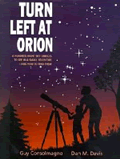
Turn Left at Orion Book CoverTurn Left at Orion has become a very famous book, one which has had lots of positive reviews on book sites such as Amazon and other astronomy web sites, so it was good to get hold of a copy to see what this book is all about.

Turn Left at Orion is really about how to find 100 objects in the night sky using binoculars or a small telescope, the book cover actually mentions using a 50-70mm aperture telescope.

This version of the book is the seventh printed edition from 2007 and all data in this book has been updated to the year 2011. The start of the book tells you the basics about viewing the night’s sky and how to use the book.

The moon is mentioned in this book in sections of the lunar cycle with each page giving you an image of the view of the moon you will see in the sky and the main areas to look for. There is then a list of worldwide lunar eclipse dates.

Turn Left at Orion also contains details on all the planets with a couple of pages for each, telling you what to look out for, and how to find the planets.

The main parts of the book are given over to looking at objects in the sky. There are four main sections which are given over to each season of the year, and what you can find in the sky.

Each page tells you what the conditions need to be like to see the object, the eyepiece you will need to use and in what months you can view the object. There are also symbols telling you if you can see the object with binoculars or a telescope.

The page then tells you where to look in the sky, and what you need to find in your finder scope before you view the object in the telescope.  There are then comments on the object and information on what you are actually looking at.

At the rear of the book is a chapter on how to run a telescope, detailing the basics of different type of telescope and how to use your telescope and get the best out of it, by learning how to use your telescope mount, when to observe and to remember to cool down the telescope as well as how to store and maintain your telescope.

There is also a small two page glossary and a full table of objects that are described in the book, which provides you information on the RA and Dec positions, the type of object, what type of sky it needs to be to see the object, and which eyepiece to use.

There is a small section on objects in the Southern Hemisphere, useful if you go on holiday to the Southern Hemisphere you will be able to recognise objects not visible in the Northern Hemisphere.

Overall Turn Left at Orion does appear to be a very useful book for beginners and is suitable for all ages.  I am sure Turn Left at Orion will help you but I think that some colour photos of the night sky could help or by displaying the main stars joined up in constellations can sometimes also help or give a wider view of the nights sky in each image could have helped to direct people to home in on the location they need to be looking.

Although finding objects in the sky is never easy and it is really easy to give up, but if you stick with it, finding objects can be really rewarding, all you have to do is learn one constellation a night and you will soon get know lots of objects in the night sky.

Turn Left at Orion is available at Waterstones