Archive for August, 2007

The 300m-wide (984ft) rock, known as Apophis, will fly past Earth in April 2029 at a distance that is closer than many communications satellites.

The British design calls for a small, remote-sensing spacecraft, dubbed Apex, which could rendezvous with Apophis in January 2014.

It would spend three years tracking the rock, sending data back to Earth about the object’s size, spin, composition and temperature.

From this information, orbit modelling would enable a more accurate prediction of the risk of any future collision.

Apophis caused some consternation in 2004 when initial observations suggested it might hit Earth in 2029.

Further study by ground-based telescopes indicated there was virtually no chance of this happening, and the expectation is that the object will whiz past the Earth at a close but comfortable distance of just under 36,000km (22,370 miles).

Personally I can’t wait to be around to have a look at it in 2029, only 22 years left to wait! I can’t imagine the type of Telescope I may own then!

After owning my Bresser Messier 130N for around two months I decided to invest in an RA Motor Drive for it. This particular RA Drive fits just the 130N and R90 telescope models. Other models of telescope in the Messier range can use another drive system which operates both the RA and Dec Axis.

I decided to buy one as I thought that the Messier RA Drive would make my job of keeping an object centered a lot easier, whether this worked or not can be discussed in another post when I actually review the RA drive, but this post will take you through how to attach your RA Drive to your MON1 telescope mount (as you can tell from the images I did this in the garden on a nice hot summer day).

Unpacking your RA Motor Drive

You should find the following contents in your box, the nice manufacturers even supply an Allen key and screwdriver!

Below you can see the hand controller, battery pack, motor, screwdriver and RA knob etc.
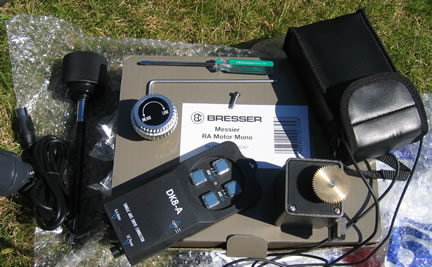
RA Motor Drive MON1 Contents

Attach the Motor

The first thing you need to do is attach the motor part to your MON1 mount.
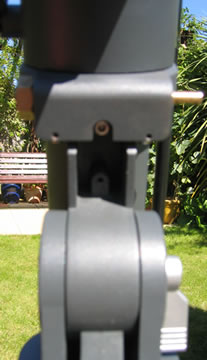
MON1 Mount Hole for RA Drive Motor

You need to first tilt up your telescope mount to reveal a screw hold underneath as shown above, this is where your Allen key screw will go.
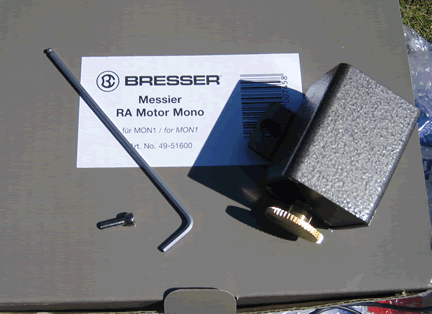
Fitting the RA Motor Drive for MON1 Mounts

Now locate the motor and the Allen key and the screw, and get ready to attach the motor.
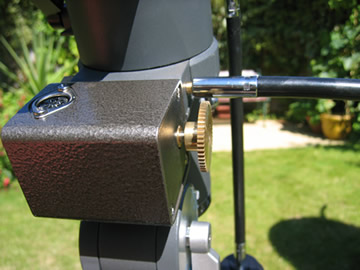
RA Motor Drive Fitted

The image above shows the motor attached by the single screw.

Remove RA Arm

Now remove your RA ‘wobbly’ movement arm, just unscrew the screw on this and remove it, so you are left with your mount looking like the image below:
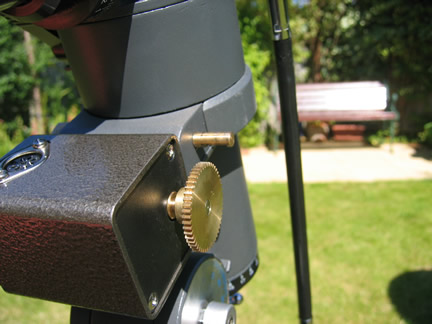
Remove RA Handle

Screw on RA Knob

Now screw onto this the new RA adjustment knob. There are two screws to this so make sure you align it up properly and screw both of them quite tightly using the provided screwdriver. The most important part to this is to make sure you get the teeth of both cogs nicely touching, not so tight so they don’t move but so they can turn each other.
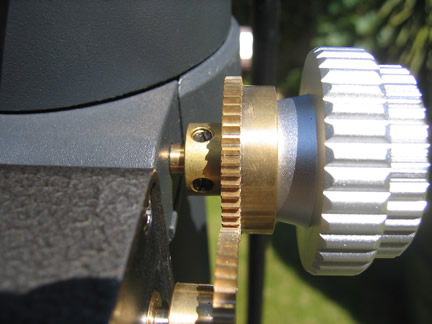
Adding the RA Cog Wheel

Attach Hand Controller

Now attach the hand controller DIN plug to the motor drive, as shown below:
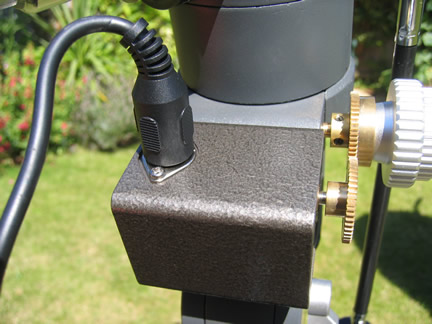
Motor Drive Hand Controller

RA Motor Drive Batteries

Finally you will need 4 x D Batteries to get the RA Drive to work, I purchased mine from Wilkinsons, and only paid about £1.20 for 4, the instruction booklet says you can use an AC adaptor but I would not recommend it.
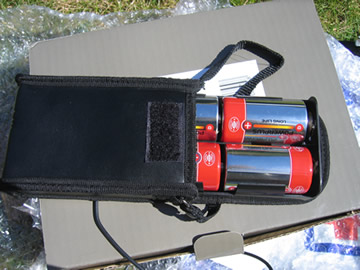
RA Motor Battery Pack

Now plug the mains lead into the hand controller and you are ready to go!

RA Motor Drive Hints and Tips

I would advise removing two of the batteries when you are not using the RA drive, as the batteries could still use a little power.

Always remember to ‘Unlock’ the RA handle when you want to manually move the telescope on its RA axis or you could damage the motor drive. It’s also important to check that the same RA handle is completely ‘Locked’ when you want to use the RA Motor Drive as sometimes it can come loose and the telescope can stop moving.

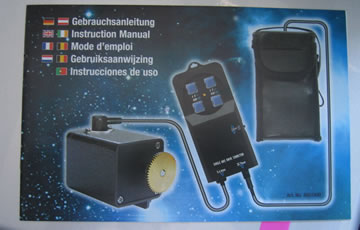
RA Motor Drive Instruction Manual

There is a very good instruction manual included in the box, which is shown below and it should tell you everything you need to know.

RA Motor Drive Manual Cover

Discovering The Solar SystemThis is the second edition of Discovering the Solar System (ISBN 0470018313) and is said to be essential reading for all undergraduate students for whom astronomy or planetary science are components of their degrees, but also suitable for people with a keen interest in astronomy.

A small amount of scientific knowledge is assumed in addition to the familiaritiy with basic algebra and graphs.

Discovering the Solar System is definitely not a book for those who want to see amazing pictures of the cosmos as this book is mainly textual with very few images, those that are included are in black and white, although the book does include a number of tables and diagrams to aid your understanding of the subject.

Discovering the Solar System contains 12 chapters and it begins by covering the Sun and its family, then the origin of the solar system including solar nebular theories and the formation of satellites and rings of the giant planets.

Further chapters discuss small bodies in the solar system such as asteroids, comets and meteorites. There are two chapters covering the interiors of planets and satellites from a observational and theoretical basis including gravitational and magnetic field data to the models of individual bodies, such as the terrestrial planets, satellites and the giant planets.

The following three chapters then cover the surfaces of planets and satellites including methods and processes such as processes that produce the surfaces of planetary bodies, weakly active surfaces of the Moon, Mercury, Mars and icy surfaces. Then there is a chapter on looking at active surfaces of the Earth, Venus, Io and Icy surface moons.

The final three chapers discuss the atmospheres of various objects including the planets and satellites, rocky and icy-rocky bodies and finally the atmospheres of the giant planets.

Overall Discovering the Solar System is a very technical and in-depth book containing a lot of mathematical equations and examples. It also includes essay style questions at the end of every chapter with answer guides in the back. The book also contains in-depth glossary at the rear. A great book on the theory behind our galaxy.

Discovering the Solar System is available from Amazon

Google Sky Review

23rd Aug, 2007

Last night I managed to download the newly update version of Google Earth which includes the new Google Sky add in. I had the previous version of Google Earth installed on my laptop, and the upgrade was seamlessly easy.

Google Earth starts with the image of the Earth and you the have to click on the ‘Sky’ button the toolbar to access Google Sky.

I was then presented with a horizon free view of the sky. Some parts of the sky look like a patchwork quilt of images, where you can see the joins of the images.

You can search for objects or zoom-in on them using the on screen controls. It is also possible to see the astronomical constellations by playing with settings.

The movement of the ’sky’ is very smooth via the online streaming. I did find it difficult to find planets using the search facility, and the in-built ‘planets in motion’ facility where you can see planets orbiting in time was not that great as I managed to get overlaps of a lot of images, unless that was the intention of the program.

I was amazed to see RA and Dec settings on the screen, so the program is usable when using setting circles.

A lack of the horizon is a dissapointment, but I think Google Sky is not trying to be the new Starry Night Pro, but it is a very good tool in order to get a general education in astronomy for beginners, so is a good educational tool.

The Google Sky images are also very good and of high quality, well done Google on this free tool.

If I find out more about the program and features I shall add them to the review.

BBC iPlayer Beta Review

23rd Aug, 2007

I know this is not completely related to Astronomy, but it is sort of when I am trying to watch The Cosmos which I missed on TV the other day.

After waiting for 6 hours for an email saying I could try the BBC iPlayer, I then logged in and tried to download The Cosmos, but I have been having problems.

When I first logged in, every screen after that was asking for my username and password, I think I was asked 3 times for my details before I got to the section where I could download a TV program.

I then found I had to download a client iPlayer to watch the TV programs, for that I needed a second username and password. How many usernames do I need? Hopefully when the BBC release the iPlayer fully they will remove one of the username and password pairs.

I was doing all this on Windows Vista, but found I required Windows XP, so I moved to my laptop to download the program. The download was quite fast, the 124mb program took less than 5 minutes. I then turned off the laptop last night, as I was going to watch the program with the laptop attached to my TV the next day.

I then rigged everything up to watch The Cosmos and the BBC iPlayer told me I did not have the rights to play the video - great, DRM problems! I then tried to re-download the program, but it kept failing, so I deleted my original program and then it downloaded successfully - this time with DRM rights intact.

There appears to be bugs in the beta, but at the same time the Channel 4OD player is flawless and works really well, I can choose to download or stream programs from Channel 4OD, and as long as I have a ‘good’ signal from my wireless router I can watch streamed programs from 4OD on my laptop with no problems and only login once!

But instead the BBC have gone with downloads only, which are fast, but if you download the content the BBC don’t want you to keep the file for longer than 30 days plus if you have watched your downloaded program once then the BBC iPlayer program will be useless after 7 days, so DRM is used, which I don’t like, can’t you just keep the download as long as you want? You can if you record the program off of the TV.

I had set my Windows Vista Media Center to record the whole series, but somehow I turned the computer off whilst it was recording - I think! Anyway I don’t seem to have the episode.

After looking at the OU website, someone says in the forum that The Cosmos is repeated on the BBC iPlayer for 7 days.

So I have applied for a BBC iPlayer account - but will I get one? So far after 5 hours no email.

The BBC seem to repeat everything else, but not a repeat of this during the week, as far as I can see, but they do repeat The Sky at Night, typical!

BBC iPlayer Update

I have now been sent my new BBC iPlayer account, I had to wait about 6 hours for my email.

I have just logged in and YES! The Cosmos Episode 3 is in BBC iPlayer!!

I am about to sit back and watch.

Second Update

BBC iPlayer does not work on Windows Vista! ahhh, so I will have to use my laptop and watch it on that or I could connect the laptop to my TV via an S Video connection.

Google have apparently launched Google Sky, I saw it on BBC Breakfast this morning when they spoke to Sir Patrick Moore about it.

The funny thing is I did not know the name of the product this morning so I searched in Google for many possible names including Google Galaxy, Google Solar System and others. But it’s actually called Google Sky. The problem is now I still can’t find the URL for it, is it released yet?

I also understand it is a plug-in/add-on for Google Earth and that the images are taken from Hubble.

Imagery for the system also came from six research institutions including the Digital Sky Survey Consortium, the Palomar Observatory in California and the United Kingdom Astronomy Technology Centre.

I can’t wait to give it a go and see if I need to stop using Starry Night. Somehow I don’t think it will replace Starry Night Pro. Especially after I looked at Google Mars and Google Moon which in my opinion were not that great.

The good thing about this launch is that it also allowed me to find other programs such as Stellarium, which is a free open source tool that gives people a chance to access more than 210 million stars, in addition to planets and moons.

I now need to download Stellarium and try it out, as the screenshots look very good.

AstrophotographyAstrophotography ( ISBN 0540083127 ) begins with a brief introduction to the solar system, planet rotation, and our night’s sky. The book then covers astrophotography equipment, such as various cameras, film, lenses and tripods.
There is a nice section that runs you through what’s involved in a night’s photography such as preparations and ending the photo session. Astrophotography then contains several chapters on photographing the moon, the sun, the stars and the planets in turn.

Each chapter contains some great information on how best to photograph your subject and it suggests when and how to photograph including the best lenses and exposures to use. The book also contains information on how to build your own Haig equatorial camera mount.

There is an interesting chapter entitled “The Earth is a planet too!” which talks about other photography opportunities on our planet including taking shots of aurorae, rainbows, coronas, moonlight and twilight shots etc.

Astrophotography also contains information on taking photographs of meteors, satellites, aircraft and comets. There is then a chapter on processing your film, which is only of information to you if you use a non-digital camera.

Finally the last chapter is about digital photography, and new motorized and GoTo telescopes and what they mean to astrophotography. There is also information on performing afocal photography, which is where the camera is held or fitted to the eyepiece of the telescope. The use of CCD cameras and web cams are also discussed.

This edition of Astrophotography is the updated edition of 2002. I think one main area that disappointed me about this book was that I expected it to go into great detail about digital astrophotography, web cams and how to get the best out of pictures by using software such as photoshop.

Unfortunately the book does seem dated as it mainly covers 35mm film photography with just some information on digital photography at the end of the book. I think the book could do with a complete re-write. A lot of the information about astrophotography is common between whatever camera you use, but I would have thought that most astronomers now use digital cameras and laptops etc.

Otherwise astrophotography is a good book containing a lot of information about how to take photos of our solar system and the colour photos are really good. Overall Astrophotography is a good book on the introduction to film and digital photography, but it could have included more information on the latest imaging technologies and astrophotography imaging techniques.

Astrophotography is available from Amazon

BBC The Cosmos - Tue 21 Aug, 7:30 pm - 8:00 pm 30mins

The third episode in the series asks how far out into space and back into time could we see?

Adam Hart-Davis travels across Chile’s ultra dry Atacama desert to the world’s largest telescope, the appropriately named Very Large Telescope, to discover how this massive machine is revealing incredible new sights from across the universe.

Meanwhile, astronomer and engineer Dr Maggie Aderin visits the strange telescope in Tuscany that will soon reveal the cosmos using gravity waves - predicted by Einstein, but until now too weak to detect. She also joins the team at the Hubble Space Telescope who produce the most famous images of space by mixing art and science.

It will be good to see the team at the Hubble Space Telescope and see how they get their photos.

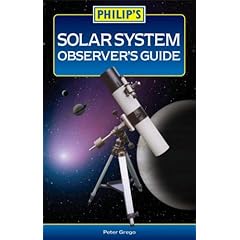
Solar System Observers GuideThe Solar System Observer’s Guide (ISBN 0540088277) is one of many of the great astronomy books from Philips. The book is around 250 pages long, with some great colour astronomy photos throughout and the book is thoroughly readable.

Solar System Observer’s Guide begins with a basic introduction to our solar system and how the human eye works. You are also introduced to the various types of telescope and how they work as well as how binoculars work. There is also some information on astronomy drawing, using a web cam and astrophotography.


Each chapter in turn then covers the planets in our solar system including (in order in the book) Mercury, Venus, Mars, Jupiter, Saturn, Uranus, Neptune and Pluto.


Each chapter gives you full data about each planet including its orbit and about the globe, as well as how to find the planet in the sky and what you will see in your telescope. Each chapter gives you a great introduction about each planet with many of the colour photographs included being taken by named astronomers.


After the planet chapters there are chapters on comets, meteors, our moon, the sun and about aurorae.


If you are after a handy sized book which gives you a general introduction to the solar system then consider the Solar Systems Observer’s Guide.


This book would also make a great astronomy book purchase for a child’s school project, especially at the prices that Philips charge for their books.